You spent hours—maybe days—crafting the perfect walk cycle, dance animation, or combat sequence. Then you upload it to a marketplace, share it in a Discord, or deliver it to a client.
But how do you prove you made it?
File metadata is trivial to edit. Timestamps can be forged. Screenshots prove nothing. And once your .bvh or .glb crosses into someone else's hands, the connection to you is gone.
MotionPrint changes that.
What is MotionPrint?#
MotionPrint is a client-side cryptographic provenance protocol for 3D motion data. In plain English: it's a system that embeds an invisible, tamper-proof signature inside your animation files—without ever uploading your work to a server.
Think of it as a digital watermark + certificate of authenticity rolled into one. Except this watermark:
- ✅ Is invisible to viewers and editors
- ✅ Survives format conversions (GLB → BVH → FBX)
- ✅ Can be verified by anyone, anywhere, with a drag-and-drop
- ✅ Links to a cryptographic certificate with your identity and timestamp
💡 The technical paper: For the full cryptographic specification, see MotionPrint: A Client-Side Cryptographic Provenance Protocol for 3D Motion Data on Zenodo.
Why Does This Matter?#
The AI animation era is exploding. Tools like our Kinetiq Engine can generate motion from text prompts in minutes. This democratizes animation—but it also creates a provenance crisis:
- Studios can't verify if a freelancer's "original" work was actually AI-generated from stolen mocap
- Marketplaces struggle to moderate copyright claims without evidence
- Creators have no way to prove they made something first
MotionPrint solves this by giving every creator a cryptographic receipt at the moment of creation.
How Does It Work? (The Non-Technical Version)#
Here's what happens when you register a MotionPrint:
1. You load your animation locally#
Your file stays on your computer. Nothing is uploaded. Ever.
2. We extract a unique "fingerprint"#
The system analyzes your animation's bone movements, timing, and structure to generate a unique hash—like a fingerprint for motion.
3. You sign it cryptographically#
Your identity (Thirdrez account) gets cryptographically bound to that fingerprint using Ed25519 signatures—the same algorithm used by SSH, WhatsApp, and blockchain systems.
4. We issue a certificate#
You receive:
- A JSON report (machine-readable proof)
- A PDF certificate (human-readable, with QR code)
- A public verification link anyone can use
The signature is permanent. Even if Thirdrez disappeared tomorrow, anyone with the certificate can mathematically verify it was signed by you, at that exact moment, for that exact file.
Privacy First: Your Files Never Leave Your Device#
This is the part that surprises most people.
When you verify a MotionPrint (without logging in):
- ✅ All processing happens in your browser (client-side JavaScript)
- ✅ Your file never touches our servers
- ✅ We only see the extracted watermark hash
- ✅ No logs, no tracking, no personal data
When you register a MotionPrint (logged in):
- ✅ We store: watermark hash, timestamp, your user ID
- ✅ We don't store: the file itself, its contents, or any previews
- ✅ You can request deletion of reports anytime
- ✅ Registrations are permanent (for integrity—like blockchain)
📜 Full details: Privacy Policy - MotionPrint section
Step-by-Step: Verify Any Animation (No Login Required)#
Let's start with the easiest action: verification. You can verify if any animation file has a MotionPrint watermark without creating an account.
Step 1: Go to the Public Verifier#
Visit thirdrez.com/motionprint/verify
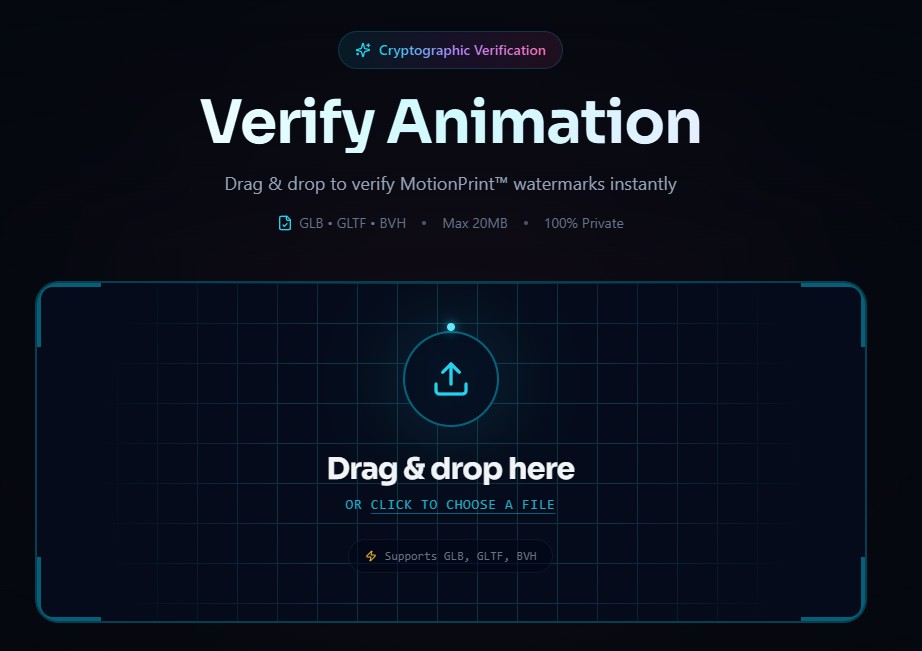
Step 2: Drag and Drop Your File#
Supported formats:
- GLB / GLTF (extracts watermark from
extrasfield) - BVH (extracts from header block)
The file is processed entirely in your browser. Watch your network tab—nothing is sent to any server.
Step 3: View Results#
If a valid MotionPrint exists, you'll see:
- ✅ Verified Motion badge
- Creator's identity (user ID or name)
- Registration timestamp
- License ID (if applicable)
- Signature method used
If no watermark is found, the file is either:
- Not registered with MotionPrint, or
- The watermark was stripped (rare—it's designed to survive most edits)
Step-by-Step: Register Your Animation (Logged In)#
Now for the powerful part: registering your own work to create permanent proof of authorship.
Step 1: Log Into the SaaS App#
Go to app.thirdrez.com/motionprint
You'll need a free Thirdrez account. If you don't have one, signup takes 30 seconds.
Step 2: Upload Your Animation#
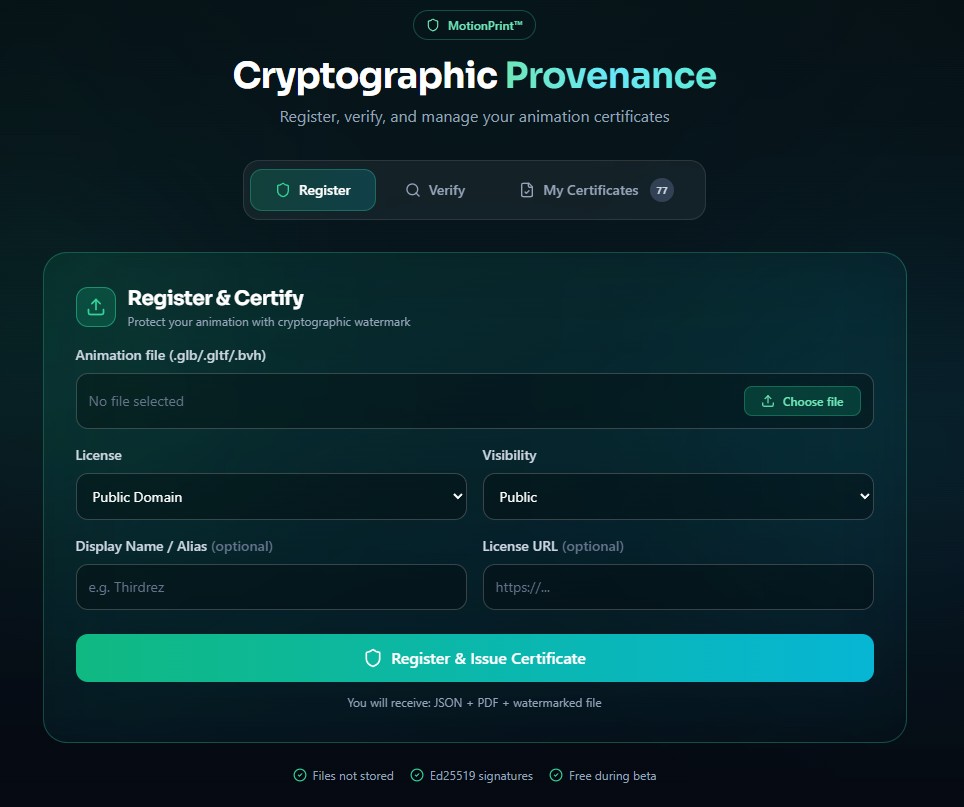
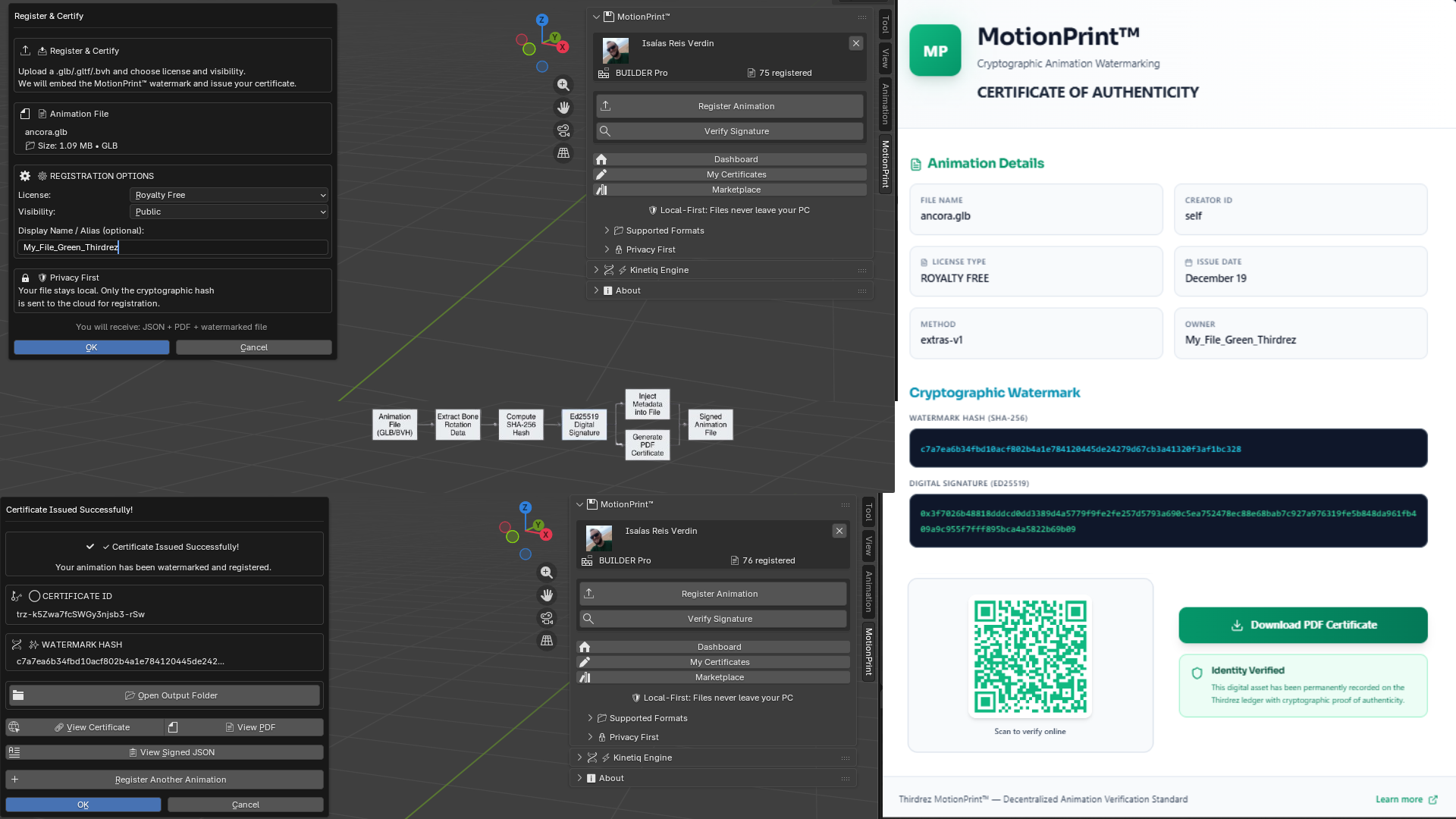
Drag your .glb, .gltf, or .bvh file into the registration panel. The system will:
- Extract the motion fingerprint (client-side)
- Sign it with your account's cryptographic key
- Generate downloadable reports
Step 3: Download Your Certificates#
You receive three outputs:
| Output | Format | Purpose |
|---|---|---|
| Signed Report | .json | Machine-readable proof for APIs and automated systems |
| PDF Certificate | .pdf | Human-readable document with QR code for manual verification |
| Watermarked File | Original format | Your file with embedded watermark (optional) |
Step 4: View Your Certificates Anytime#
All your registered MotionPrints are saved in My Certificates:
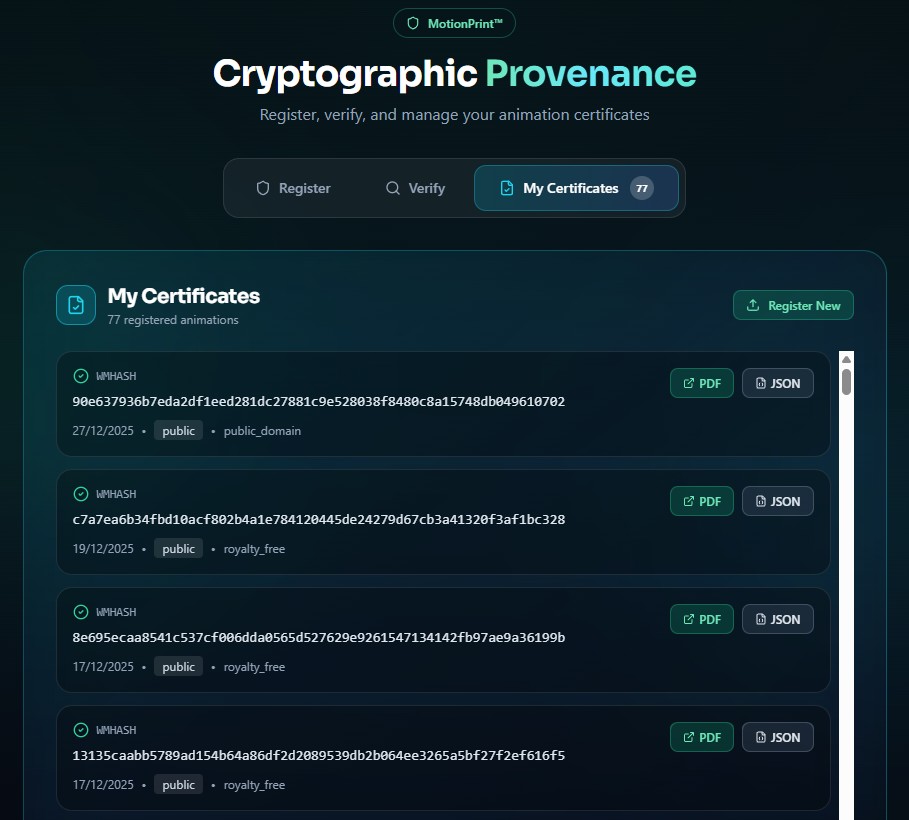
From here you can:
- Re-download certificates
- Copy public verification links
- Share proof with clients or marketplaces
Bonus: Free Blender Addon#
If you work in Blender, we've built a free addon that integrates MotionPrint directly into your workflow.
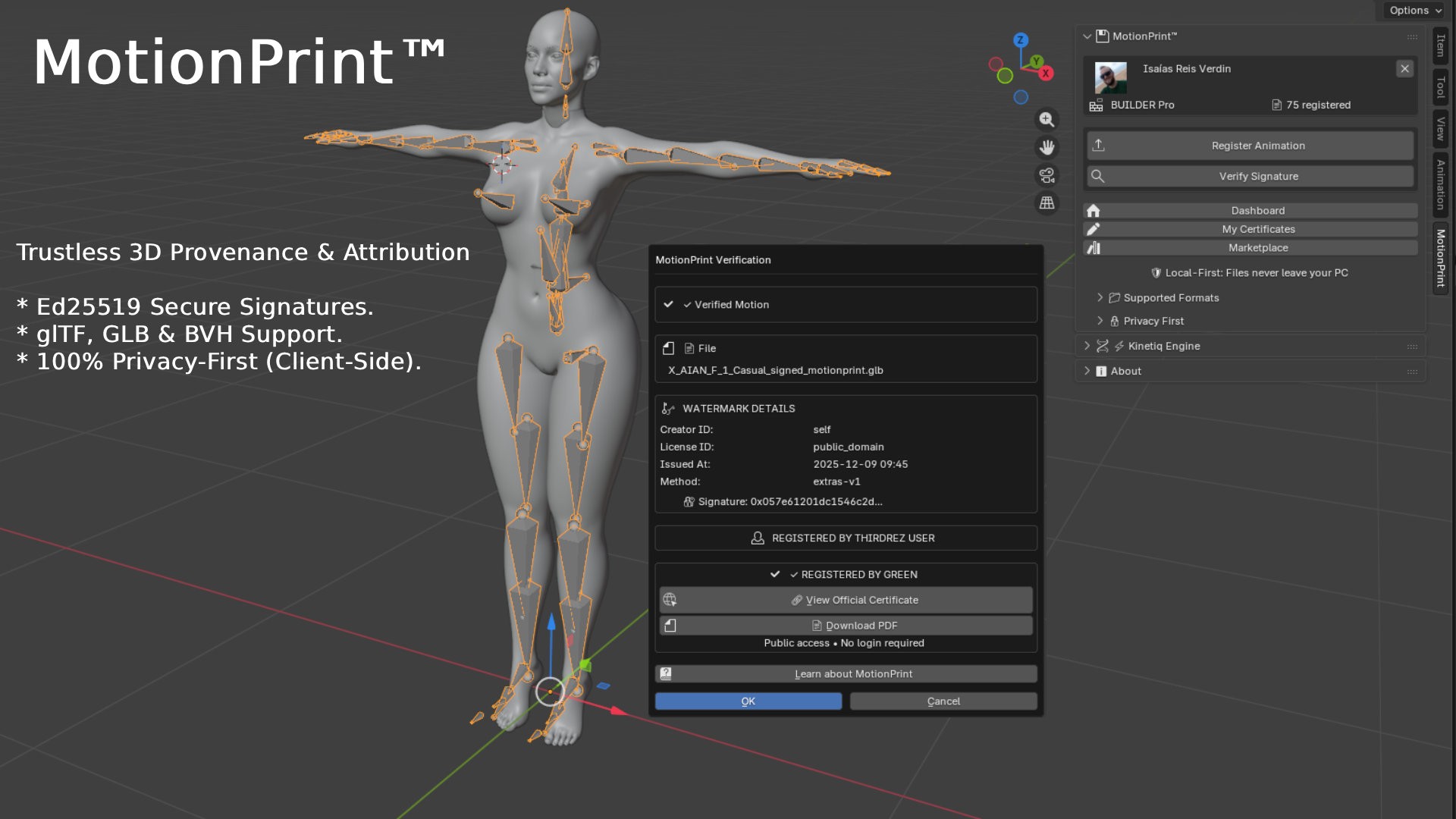
Features:#
- One-click registration from the Blender sidebar
- Verify files before import
- Sync with your Thirdrez account automatically
- View certificates without leaving the viewport
The Pipeline:#
Download (Free):#
| Platform | Link |
|---|---|
| Windows / Mac / Linux | thirdrez.com/motionprint/addon |
The addon is completely free during our public beta. No subscription required.
Common Questions#
"Do I need to upload my animation?"#
No. Your files are processed entirely in your browser (for verification) or in the Blender addon (for registration). We never see, store, or access your animation content.
"Can someone remove the watermark?"#
It's extremely difficult. The watermark is embedded in the motion data itself—in the mathematical structure of bone rotations and positions. Basic edits (trimming, retargeting, format conversion) don't remove it. Only a deliberate, targeted attack could—and even then, the fingerprint system can detect derivatives.
"What if I sell my animation—does the MotionPrint transfer?"#
The watermark stays in the file forever. If you sell or license your work, the new owner can always verify the original creator (you). This is a feature, not a bug—it's proof of provenance, not ownership transfer.
"Is this like blockchain?"#
Philosophically, yes. Technically, no. We use cryptographic signatures (Ed25519) rather than distributed ledgers. The result is similar—immutable proof of a timestamp and identity—but without the energy costs or blockchain complexity.
"Why are registrations permanent?"#
MotionPrint is designed as proof of authorship. If we allowed deletion, anyone could claim they "never registered" a disputed work. The permanence is what makes it trustworthy for legal and commercial disputes.
The Technical Spec (For the Curious)#
For developers, researchers, and the technically inclined, the full specification is published as an academic paper:
MotionPrint: A Client-Side Cryptographic Provenance Protocol for 3D Motion Data
Zenodo • December 2025
The paper covers:
- Fingerprint extraction algorithms
- Ed25519 signature implementation
- Format-specific embedding (GLTF extras, BVH header)
- DTW-based similarity matching for derivative detection
- Privacy architecture and threat model
Start Proving Your Work Today#
MotionPrint is free during public beta. Every animator, rigger, and motion designer deserves provable ownership of their work.
Quick Links:#
| Action | Link |
|---|---|
| Verify any animation (no login) | thirdrez.com/motionprint/verify |
| Register your work (requires account) | app.thirdrez.com/motionprint |
| Download Blender Addon | thirdrez.com/motionprint/addon |
| Read the technical paper | Zenodo |
| Learn more | thirdrez.com/motionprint |
MotionPrint™ is a trademark of Thirdrez. The protocol specification is published openly to encourage ecosystem adoption.
MotionPrint was featured on Product Hunt in December 2025.